
Subnetting
Oct 18, 2026 · Networking
One line
Subnetting = splitting IP (Internet Protocol) addresses into networks. It answers: How big is this network? Where does it start and end? Is this IP inside it?
Related: OSI Model · IP Addresses · Switches vs Routers
Reference: Acronyms · Ports
Why it matters for pentesting
- Scope. A pentest only covers the IPs in scope, for example
10.10.20.0/23but not10.10.22.0/24. Scanning an IP outside it can break the contract or the law. - Planning scans.
nmap 10.10.0.0/16= 65,534 hosts (slow and noisy).nmap 10.10.5.0/24= 254 hosts (minutes). - Knowing where you landed. On a new machine,
ipconfig(Windows) orip a(Linux) shows its IP and mask. From that you can work out the network, its size and the gateway, then look for other subnets to move into (pivoting). - Reading recon results. Is this IP internal? Are these two hosts on the same network (so ARP (Address Resolution Protocol) spoofing could work between them)?
How deep to go
| Need to know | Can skip |
|---|---|
CIDR (Classless Inter-Domain Routing, the /number) > hosts and mask | Fast binary conversion in my head |
| Network address and broadcast address | VLSM (Variable Length Subnet Masking) network design |
| Is an IP inside a range? | Route summarization (supernetting) |
| The cheat sheet below from memory | Deep IPv6 (IP version 6) subnetting |
The cheat sheet (memorize this)
| CIDR | Subnet mask | Usable hosts | Where I'll see it |
|---|---|---|---|
| /32 | 255.255.255.255 | 1 | One specific host |
| /31 | 255.255.255.254 | 2 | Router-to-router links (special case) |
| /30 | 255.255.255.252 | 2 | Link between two routers |
| /29 | 255.255.255.248 | 6 | Small server groups |
| /28 | 255.255.255.240 | 14 | Small segments |
| /27 | 255.255.255.224 | 30 | |
| /26 | 255.255.255.192 | 62 | |
| /24 | 255.255.255.0 | 254 | Most common by far |
| /23 | 255.255.254.0 | 510 | |
| /22 | 255.255.252.0 | 1,022 | My home Wi-Fi |
| /21 | 255.255.248.0 | 2,046 | |
| /20 | 255.255.240.0 | 4,094 | My WSL (Windows Subsystem for Linux) adapter |
| /16 | 255.255.0.0 | 65,534 | Big company networks |
| /8 | 255.0.0.0 | 16,777,214 | All of 10.x.x.x |
Two shortcuts
- Usable hosts = 2^(32 − CIDR) − 2. The −2 is the network and broadcast addresses, which devices cannot use.
- Each step down in CIDR doubles the size. /24 = 254, /23 = 510, /22 = 1,022.
The mask "magic numbers" (one octet, from 1 bit to 8 bits):
| Bits | 1 | 2 | 3 | 4 | 5 | 6 | 7 | 8 |
|---|---|---|---|---|---|---|---|---|
| Mask value | 128 | 192 | 224 | 240 | 248 | 252 | 254 | 255 |
| Block size (256 − value) | 128 | 64 | 32 | 16 | 8 | 4 | 2 | 1 |
These aren't random. Each one is just the bit values added up from the left:
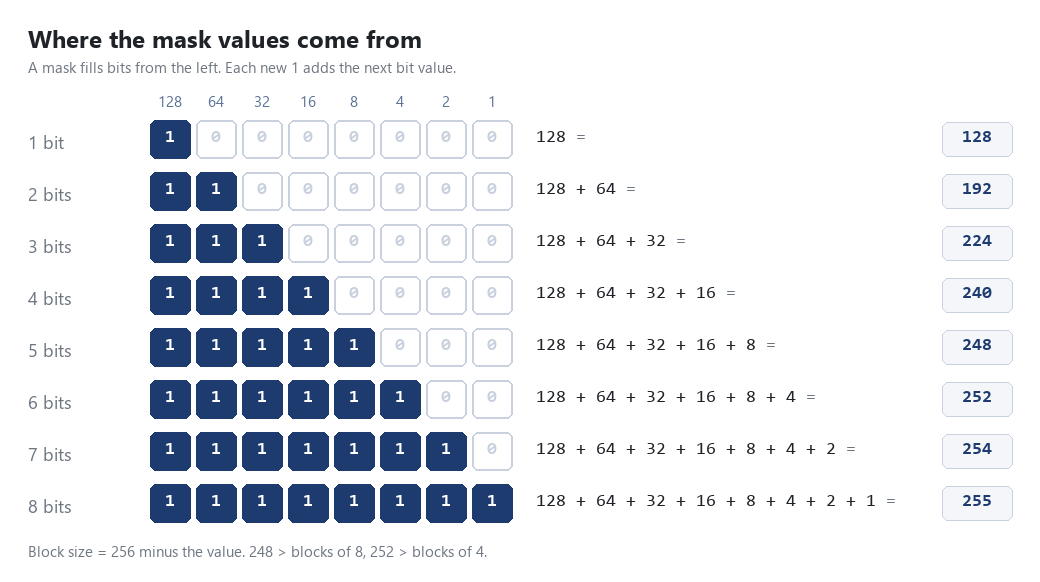
And here's my own version of the full cheat sheet, so I can read off any mask:
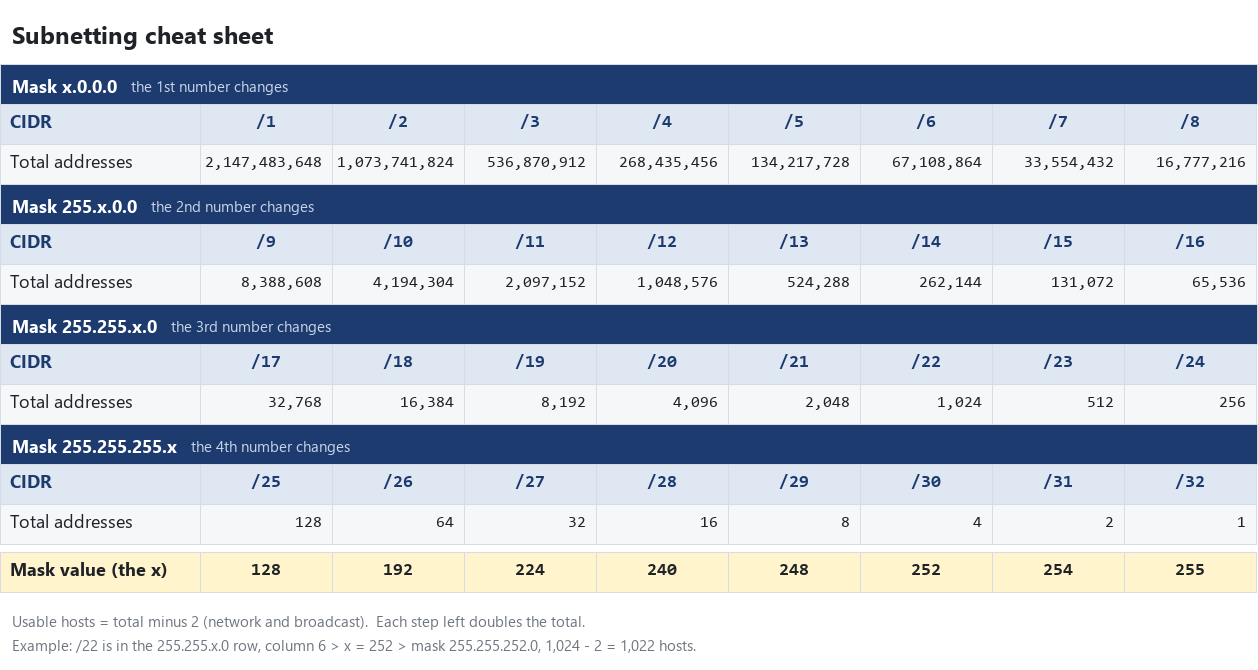
Reading The Cyber Mentor's subnetting sheet
How the rows work. The sheet has 4 rows, one per octet. The yellow header says which octet holds the x, meaning the octet that is only partly filled with 1s:
| Row header | CIDRs | What it means |
|---|---|---|
Subnet x.0.0.0 | /1 to /8 | 1st octet changes |
Subnet 255.x.0.0 | /9 to /16 | 1st octet is full (255), 2nd changes |
Subnet 255.255.x.0 | /17 to /24 | First 2 octets full, 3rd changes |
Subnet 255.255.255.x | /25 to /32 | First 3 octets full, 4th changes |
How to get the x.
- Find your CIDR's column (1 to 8). Shortcut: CIDR minus the full octets before it (0, 8, 16 or 24).
- The bottom row "Subnet Mask (Replace x)" at that column is the x:
128 192 224 240 248 252 254 255. - Put x into the row header.
Why it works: the column number is how many 1s spill into that octet. Column 5 = 5 ones = 128 + 64 + 32 + 16 + 8 = 248.
| CIDR | Row | Column | x | Mask |
|---|---|---|---|---|
| /21 | 255.255.x.0 | 21 - 16 = 5 | 248 | 255.255.248.0 |
| /19 | 255.255.x.0 | 19 - 16 = 3 | 224 | 255.255.224.0 |
| /12 | 255.x.0.0 | 12 - 8 = 4 | 240 | 255.240.0.0 |
| /24 | 255.255.x.0 | 24 - 16 = 8 | 255 | 255.255.255.0 |
The last column (/8, /16, /24, /32) always gives x = 255, because that octet is full.
The Hosts row is total addresses. Always subtract 2 (network ID = first address, broadcast = last address), except /31 and /32. Each step left doubles the number.
The course examples
| Address | Mask | Hosts | Network | Broadcast | Why |
|---|---|---|---|---|---|
192.168.1.0/24 | 255.255.255.0 | 254 | 192.168.1.0 | 192.168.1.255 | The whole last octet |
192.168.1.0/28 | 255.255.255.240 | 14 | 192.168.1.0 | 192.168.1.15 | 16 addresses: .0 to .15 |
192.168.1.16/28 | 255.255.255.240 | 14 | 192.168.1.16 | 192.168.1.31 | Next block of 16: .16 to .31 |
192.168.0.0/23 | 255.255.254.0 | 510 | 192.168.0.0 | 192.168.1.255 | Block size 2 in the 3rd octet: covers .0.x and .1.x |
192.168.2.0/23 | 255.255.254.0 | 510 | 192.168.2.0 | 192.168.3.255 | Next block: covers .2.x and .3.x |
192.168.1.0/23 | 255.255.254.0 | 510 | 192.168.0.0 | 192.168.1.255 | Trick row (blank in the video) |
The trick row: 192.168.1.0/23
A /23 has block size 2 in the 3rd octet, so networks start at 0, 2, 4 ... 1 is not a block start. 192.168.1.0 is just a host inside 192.168.0.0/23, the same network as row 4.
So a range written as 192.168.1.0/23 actually covers 192.168.0.0 to 192.168.1.255.
The method: block size in 4 steps
Works for any IP and mask, no binary needed.
- Find the interesting octet: the one where the mask is not 255 and not 0 (if it is all 255s then a 0, use the 0 octet).
- Block size = 256 − that mask value.
- Network address: the biggest multiple of the block size that is less than or equal to the IP's number in that octet. Octets after it become
0. - Broadcast address: next block start − 1. Octets after it become
255.
The 4 octets
An IPv4 address has 4 numbers called octets (8 bits each): 192 . 168 . 12 . 34 = octets 1, 2, 3, 4.
Example addresses
The "my Wi-Fi" and "my WSL" examples below use dummy addresses in place of my real ones, so the notes are safe to share. The math works exactly the same way.
Worked examples
My Wi-Fi: 192.168.12.34/22
- Mask
255.255.252.0> interesting octet = 3rd (252). - Block size = 256 − 252 = 4. Blocks in the 3rd octet: 0, 4, 8, 12, 16 ...
- 12 is a multiple of 4 > network =
192.168.12.0 - Next block is 16 > broadcast =
192.168.15.255 - Hosts = 2^(32 − 22) − 2 = 2^10 − 2 = 1,022
- Is
192.168.14.10on my network? Yes (14 is between 12 and 15). - Is
192.168.16.1? No (16 starts the next block).
My WSL adapter: 192.168.176.1/20
- Mask
255.255.240.0> 3rd octet (240). - Block size = 256 − 240 = 16. Blocks: ... 160, 176, 192 ...
- Network =
192.168.176.0, broadcast =192.168.191.255, hosts = 2^12 − 2 = 4,094.
Example: proof from my own PC
Windows lists each network's broadcast address in the ARP cache. Both match the math above.
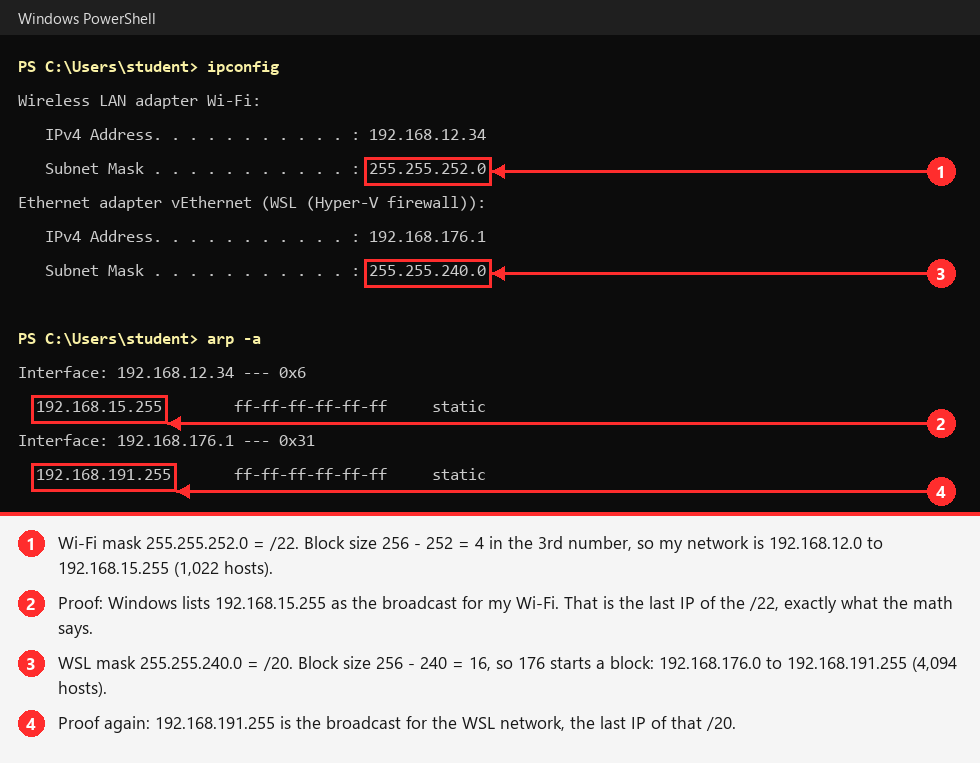
Try it yourself
Run ipconfig, work out the network and broadcast for each adapter on paper, then check with arp -a (look for the .255 entry with ff-ff-ff-ff-ff-ff).
A small one: 10.10.20.77/26
- Mask
255.255.255.192> 4th octet (192). - Block size = 256 − 192 = 64. Blocks: 0, 64, 128, 192.
- 77 falls in the block starting at 64 > network =
10.10.20.64 - Next block 128 > broadcast =
10.10.20.127 - Hosts = 2^6 − 2 = 62. Usable range:
10.10.20.65to10.10.20.126.
Scope check: is it in 10.10.20.0/23?
- Mask
255.255.254.0> 3rd octet (254), block size 2. - 20 is a multiple of 2 > range =
10.10.20.0to10.10.21.255. 10.10.21.200> in scope10.10.22.5> out of scope. Do not scan it.
Nmap and subnets
nmap -sn 192.168.12.0/22-sn = ping sweep (find live hosts, no port scan). Nmap accepts CIDR ranges directly, so the size of the range = how many hosts it will try.
ipcalc 192.168.12.34/22On Kali Linux: shows network, broadcast, host range and host count. Use it to check my mental math.
Borrowing bits: splitting a network
Subnetting = borrowing bits from the host part to make more, smaller networks.
- Every bit borrowed doubles the number of subnets and halves the size of each one.
- Subnets = 2^(bits borrowed)
- New CIDR = old CIDR + bits borrowed
- Usable hosts per subnet = 2^(host bits left) − 2
Course example: 192.168.0.0/24, borrow 2 bits > 2^2 = 4 subnets of /26 (mask 255.255.255.192 = 11111111.11111111.11111111.11000000). Block size 64:
| Subnet | Network | Range |
|---|---|---|
| 1 | 192.168.0.0/26 | 192.168.0.0 to 192.168.0.63 |
| 2 | 192.168.0.64/26 | 192.168.0.64 to 192.168.0.127 |
| 3 | 192.168.0.128/26 | 192.168.0.128 to 192.168.0.191 |
| 4 | 192.168.0.192/26 | 192.168.0.192 to 192.168.0.255 |
Each subnet can be used for a different segment, like one per office floor or department. The 2 borrowed bits count up 00, 01, 10, 11 across the 4 subnets.
Need a number of subnets that is not a power of 2? Round up. 5 subnets > borrow 3 bits (2^3 = 8), use 5 and keep 3 spare.
Practice
Use the Subnetting Course. No timer. Short lessons, then questions I work out in my notebook and type in. Finish a part to unlock the next:
- Bits: read and write one octet in binary
- Masks: turn a /number into a mask and back
- Hosts: how many devices a network holds
- Ranges: network address, broadcast, first usable
- The Sheet: read The Cyber Mentor's sheet, get the x for any row, and work the course examples (including the trick row)
- Pentesting: scope checks, splitting a network, landing on a machine
Wrong answer = a hint. Two wrong = "Show me how". After a part, Practice gives unlimited random questions for it.