
Switches vs Routers
Oct 18, 2026 · Networking
One line
Switch = Layer 2 = MAC (Media Access Control) addresses = same network.
Router = Layer 3 = IP (Internet Protocol) addresses = between networks.
Related: OSI Model · IP Addresses · MAC Addresses · ARP and DHCP
Reference: Acronyms · Ports
Switch: Layer 2, MAC addresses
"Switching" = moving data between devices on the same network. A switch connects devices on one LAN (Local Area Network) and gets each frame (a Layer 2 packet) to the right port.
It keeps a MAC address table, also called a CAM (Content Addressable Memory) table:
| Port | MAC address |
|---|---|
| 1 | BC-03-58-11-22-33 (my PC) |
| 2 | AA-11-22-33-44-55 (printer) |
| 3 | CC-66-77-88-99-00 (router) |
How it works:
- Learns: a frame arrives on port 1. The switch reads the source MAC and records "this MAC lives on port 1."
- Forwards: it reads the destination MAC, looks it up, and sends the frame out only that port.
- Floods when unsure: if the destination MAC is not in the table yet, it sends the frame out every port. When the right device replies, the switch learns where it is.
A switch does not look at IP addresses
It only cares which MAC is on which port.
Router: Layer 3, IP addresses
- Connects different networks, for example my home network and my ISP's (Internet Service Provider's) network.
- Reads the destination IP address and checks its routing table to decide where to send the packet next.
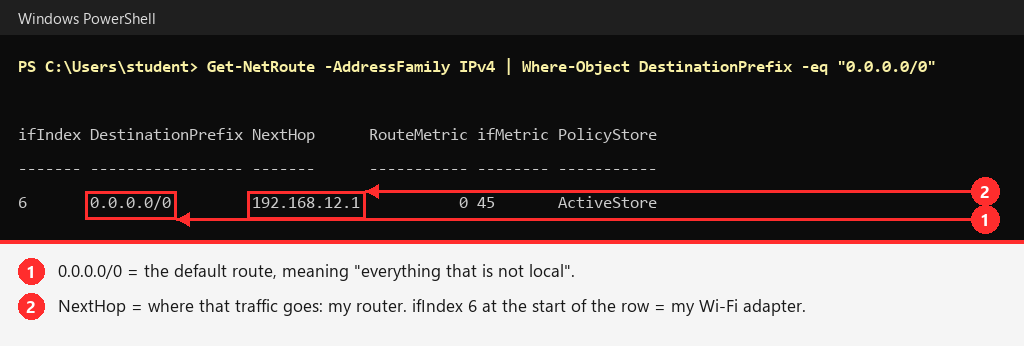
- My router is my default gateway,
192.168.12.1. My PC sends anything that is not on the local network to it.
Example: my PC's "send everything else to the router" rule
Every PC has a routing table. The most important line is the default route: "if it is not local, send it to the router."
Try it yourself
Get-NetRoute -AddressFamily IPv4 | Where-Object DestinationPrefix -eq "0.0.0.0/0"
Example: every router between me and Google
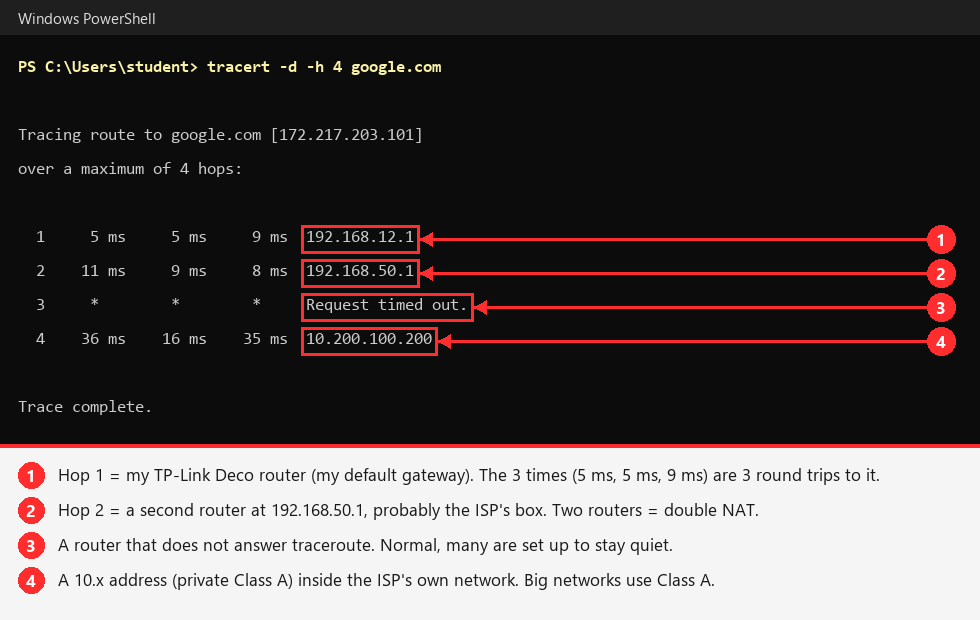
tracert (trace route) lists each router my traffic passes through. Each line = one router = one hop.
Try it yourself
tracert -d -h 4 google.com-d = show IPs only (faster), -h 4 = stop after 4 hops.
What this shows about my network
Hop 1 (192.168.12.1) is the TP-Link Deco and hop 2 (192.168.50.1) is a second router, probably the ISP's (Internet Service Provider's) box. Two routers in a row = double NAT (Network Address Translation, done twice).
Side by side
| Switch | Router | |
|---|---|---|
| OSI (Open Systems Interconnection) layer | 2 (Data Link) | 3 (Network) |
| Address it reads | MAC (Media Access Control) | IP (Internet Protocol) |
| Table it keeps | CAM (Content Addressable Memory) / MAC table | Routing table |
| Connects | Devices on the same network | Different networks |
| Forwards broadcasts? | Yes, out every port | No |
Putting it together
My PC > printer (same network):
- PC: "Who has
192.168.12.20?" (ARP (Address Resolution Protocol) broadcast toFF:FF:FF:FF:FF:FF) - Printer replies with its MAC.
- Switch delivers frames to the printer by MAC. No router involved.
My PC > google.com (different network):
- PC sees Google's IP is not on its subnet, so it sends the frame to the router's MAC with Google's IP as the destination IP.
- Switch delivers it to the router by MAC.
- Router reads the IP and forwards it toward the internet.
Key idea
MAC addresses change at every hop. IP addresses stay the same from start to finish.
MAC gets data across one local link. IP gets it across the internet.
My home router does both
The box from the ISP (Internet Service Provider) is several devices in one:
- Router (Layer 3)
- Switch (the Ethernet ports on the back, Layer 2)
- Wi-Fi access point
- DHCP (Dynamic Host Configuration Protocol) server (hands out IPs)
That is why people blur switches and routers. They are separate jobs in one box.
Why it matters for hacking
- Hubs vs switches: old hubs sent every frame out every port, so anyone could sniff everyone's traffic. Switches only send to the right port, so normally you cannot see other people's traffic.
- ARP (Address Resolution Protocol) spoofing: the workaround. Lie to the victim ("I'm the router's MAC"), the switch delivers their traffic to you, and you become the MITM (Man-in-the-Middle).
- MAC flooding: send thousands of fake source MACs to fill the CAM (Content Addressable Memory) table. Some switches then fall back to flooding everything to every port, acting like a hub.
- VLANs (Virtual LANs): a Layer 2 way to split one switch into separate networks. Attackers try to hop between them ("VLAN hopping").