
OSI Model
Oct 18, 2026 · Networking
One line
The OSI (Open Systems Interconnection) model splits network communication into 7 layers. Each layer has one job and only talks to the layer above and below it.
Related: IP Addresses · MAC Addresses · Switches vs Routers · TCP and UDP · ARP and DHCP · Subnetting
Reference: Acronyms · Ports
Why it exists
- Sending data across a network is complicated. The OSI model breaks it into 7 small, manageable jobs.
- Because each layer is separate, things can be swapped without breaking the rest. Example: Wi-Fi or Ethernet cable (Layer 1 and 2) both work with the same IP (Internet Protocol) and the same websites above them.
- It is a conceptual model, a way to think and talk about networks. Real systems mix layers sometimes, but everyone in IT and security uses these layer numbers.
Remember the order
| Direction | Mnemonic |
|---|---|
| Bottom up (1 > 7) | Please Do Not Throw Sausage Pizza Away = Physical, Data Link, Network, Transport, Session, Presentation, Application |
| Top down (7 > 1) | All People Seem To Need Data Processing |
The 7 layers at a glance
| # | Layer | Simple job | Unit of data | Address used | Device | Examples |
|---|---|---|---|---|---|---|
| 7 | Application | What the user actually wants | Data | Names / URLs | HTTP, DNS, SMTP, FTP, SSH | |
| 6 | Presentation | Translate, encrypt, compress | Data | TLS encryption, JPEG, UTF-8 | ||
| 5 | Session | Start, manage, end conversations | Data | Sessions, logins staying open | ||
| 4 | Transport | Get data to the right program | Segment | Port | Firewall | TCP, UDP |
| 3 | Network | Get data to the right network/computer | Packet | IP | Router | IP, ICMP |
| 2 | Data Link | Get data to the next device on the same network | Frame | MAC | Switch | Ethernet, Wi-Fi, ARP |
| 1 | Physical | Send raw bits (1s and 0s) | Bits | Cables, radios, hubs | Ethernet cable, Wi-Fi signal |
The 3 layers I use the most right now
- Layer 2 = MAC (Media Access Control) = switch = same network
- Layer 3 = IP (Internet Protocol) = router = between networks
- Layer 4 = ports = TCP (Transmission Control Protocol) / UDP (User Datagram Protocol) = which program
Each layer in simple words
Layer 1: Physical
- Sends and receives raw bits over a physical medium.
- Defines the electrical, mechanical and physical side: cables, plugs, voltages, radio signals.
- Examples: Ethernet cables, Wi-Fi radio waves, fiber, a NIC's (Network Interface Controller's) antenna or port.
- Problem at this layer = "Is it plugged in? Is Wi-Fi on?"
Layer 2: Data Link
- Moves frames between devices that are directly connected on the same network.
- Uses MAC (Media Access Control) addresses. Detects errors and controls who gets to use the medium.
- Examples: Ethernet, Wi-Fi, PPP (Point-to-Point Protocol), ARP (Address Resolution Protocol, IP > MAC lookup).
- Device: switch. See MAC Addresses and Switches vs Routers.
Layer 3: Network
- Moves packets across different networks.
- Uses logical addressing (IP (Internet Protocol) addresses) and picks the best path.
- Examples: IP (Internet Protocol), ICMP (Internet Control Message Protocol, ping and network errors).
- Device: router. See IP Addresses.
Layer 4: Transport
- Gets data from one program to another, end to end.
- Breaks data into segments, uses ports, and (with TCP) handles resending, ordering and speed control.
- Examples: TCP (Transmission Control Protocol, reliable) and UDP (User Datagram Protocol, fast).
- See TCP and UDP.
Layer 5: Session
- Opens, manages and closes conversations (sessions) between applications.
- Keeps track of who is talking and can pick up where it left off if something breaks.
- Example: staying logged in to a site, a remote desktop session staying open.
Layer 6: Presentation
- Makes data understandable on both ends: formatting, encryption, compression.
- Examples: TLS (Transport Layer Security) encryption for HTTPS, file formats like JPEG and PNG, text encodings like UTF-8.
Layer 7: Application
- Closest to the user. The protocols apps use to do things: web, email, file transfer, remote access.
- Examples: HTTP (Hypertext Transfer Protocol, web), SMTP (Simple Mail Transfer Protocol, sending email), FTP (File Transfer Protocol, file transfers), DNS (Domain Name System, names > IPs), SSH (Secure Shell, encrypted remote terminal).
- Note: Layer 7 is the protocol (HTTP), not the app itself (Chrome).
Encapsulation: how the layers work together
Think of envelopes inside envelopes.
Sending (going down 7 > 1): each layer wraps the data in its own envelope (a header) with its own address on it.
Layer 7  [ Data: "GET wikipedia.org" ]
Layer 4  [ TCP header: ports 52250 > 443 | Data ]                    = Segment
Layer 3  [ IP header: 192.168.12.34 > Wikipedia | TCP | Data ]        = Packet
Layer 2  [ Ethernet header: my MAC > router MAC | IP | TCP | Data ]   = Frame
Layer 1  101010110100101...                                           = Bits
Receiving (going up 1 > 7): each layer opens its envelope, reads its header, and passes the rest up.
Connects to what I learned
This is why the MAC changes at every router but the IP does not. The router opens the Layer 2 envelope, reads the Layer 3 address inside, then puts it in a new Layer 2 envelope for the next hop. See MAC only travels one hop.
Example: all the layers in one real packet
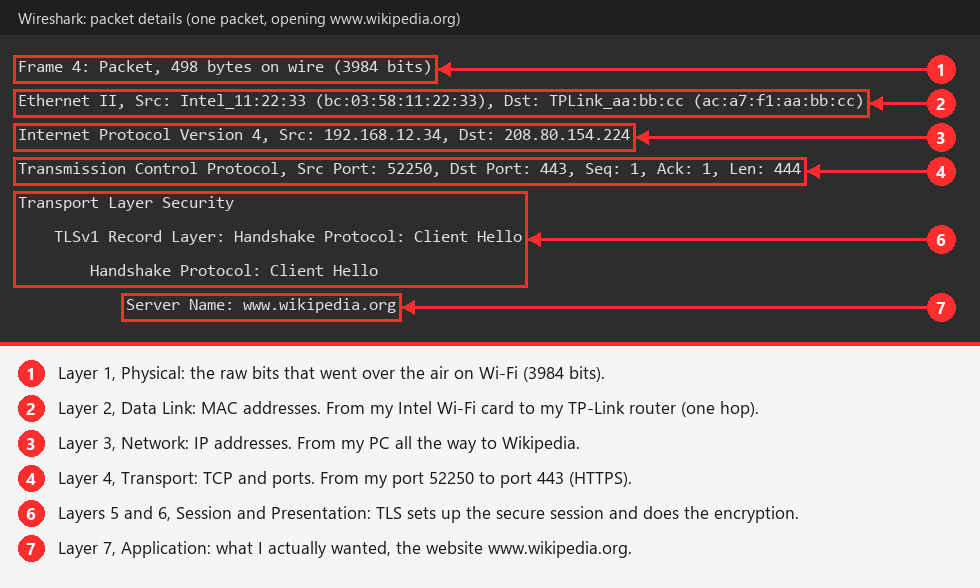
Wireshark's packet details pane is the OSI model on screen. Each line is one layer's envelope, from the bottom layer (top line) to the top layer (bottom line).
Small detail
The "Frame" line is Wireshark's info about the captured bits, the closest thing it shows for Layer 1. Layers 5, 6 and 7 are often blended together in real protocols like TLS (Transport Layer Security).
OSI vs the TCP/IP model
The internet actually runs on the simpler TCP/IP model (4 layers). Same ideas, fewer boxes:
| TCP/IP model | OSI layers it covers |
|---|---|
| Application | 7 Application, 6 Presentation, 5 Session |
| Transport | 4 Transport |
| Internet | 3 Network |
| Network Access (Link) | 2 Data Link, 1 Physical |
People still say "Layer 2" or "Layer 7" using OSI numbers, so learn OSI first.
Why it matters for hacking
Attacks by layer:
| Layer | Attack examples |
|---|---|
| 7 Application | Web app attacks, phishing, LLMNR (Link-Local Multicast Name Resolution) poisoning with Responder |
| 6 Presentation | Weak or broken encryption |
| 5 Session | Session hijacking (stealing a logged-in session) |
| 4 Transport | Port scanning (nmap -sS SYN (Synchronize) scan), SYN floods |
| 3 Network | IP spoofing, ICMP (Internet Control Message Protocol) attacks |
| 2 Data Link | ARP (Address Resolution Protocol) spoofing, MAC flooding, VLAN (Virtual LAN) hopping |
| 1 Physical | Plugging into an open network port, cutting cables, Wi-Fi jamming |
Troubleshooting bottom up: when something does not work, check from Layer 1 up. Is it connected (1)? Does it have a MAC/ARP entry (2)? Does it have an IP and can it ping (3)? Is the port open (4)? Does the app respond (7)?
Practice
Play the OSI Layers game: put the layers in order, sort terms into layers, and unwrap real packets from my Wi-Fi.