
IP Addresses
Oct 18, 2026 · Networking
One line
IP (Internet Protocol, logical address) = Layer 3 (Network layer) = what routers use to move data between networks.
Related: OSI Model · MAC Addresses · Switches vs Routers · TCP and UDP · ARP and DHCP · Subnetting
Reference: Acronyms · Ports
What an IP address is
- A logical address given to a device on a network. Unlike a MAC (Media Access Control, hardware address) it is not burned into hardware. It is handed out, usually by DHCP (Dynamic Host Configuration Protocol, auto-assigns IPs).
- IPv4 (IP version 4) looks like
192.168.12.34: 4 numbers (0 to 255), 32 bits total. - IPv6 (IP version 6) looks like
fe80::1a2b:3c4d:5e6f:7a8b: much longer, 128 bits. - IP addresses stay the same from start to finish of a trip across the internet. MAC (Media Access Control) addresses change at every hop. See MAC only travels one hop.
Private IP addresses
Private IPs are not used anywhere on the public internet. They are reserved for private LANs (Local Area Networks, home/office networks).
| Class | Range | Default mask | Hosts per network | Typical user |
|---|---|---|---|---|
| A | 10.0.0.0 to 10.255.255.255 | 255.0.0.0 (/8) | 16,777,214 | Big businesses |
| B | 172.16.0.0 to 172.31.255.255 | 255.255.0.0 (/16) | 65,534 | Medium businesses |
| C | 192.168.0.0 to 192.168.255.255 | 255.255.255.0 (/24) | 254 | Homes, small offices |
| Loopback | 127.0.0.0 to 127.255.255.255 | 255.0.0.0 (/8) | n/a | Your own machine (127.0.0.1 = localhost) |
Slide vs actual numbers
The course slide shows slightly different numbers (for example 16,646,144 hosts for Class A, and loopback ending at 127.0.0.7). The table above uses the standard values. For Class A you can change any of the last three numbers from 0 to 255, which is why it fits huge networks.
Also good to recognize
169.254.x.x = APIPA (Automatic Private IP Addressing). Windows gives itself this when DHCP (Dynamic Host Configuration Protocol) fails. Seeing it means "no DHCP server answered."
Public IPs and NAT
- Private IPs cannot be routed on the internet.
- My router uses NAT (Network Address Translation, private IP > public IP) to swap my private IP (
192.168.12.34) for its public IP when traffic leaves the house. - Every device in the house shares that one public IP. Websites see my public IP, never
192.168.12.34.
Subnet mask and CIDR
- The subnet mask says which part of the IP is the network and which part is the host (device).
- CIDR (Classless Inter-Domain Routing, the
/numbernotation) counts how many bits are the network part.255.255.255.0=/24. - Full method, cheat sheet and practice: Subnetting.
My network (from ipconfig):
| Field | Value | Meaning |
|---|---|---|
| IPv4 (IP version 4) Address | 192.168.12.34 | My PC on Wi-Fi |
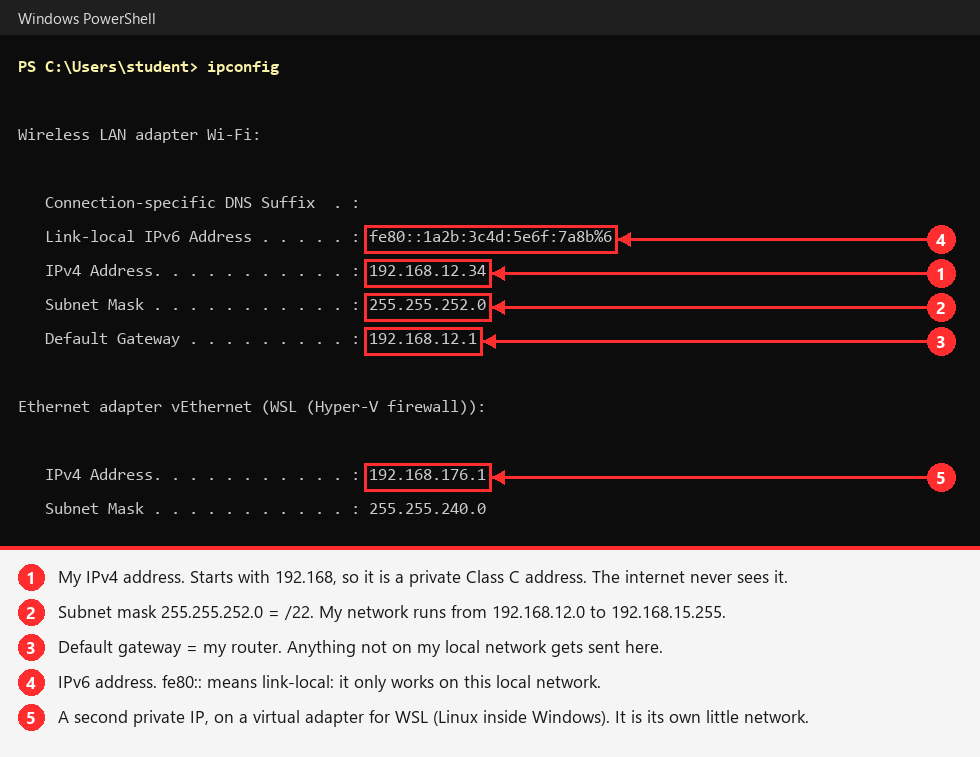
| Subnet Mask | 255.255.252.0 = /22 | Network covers 192.168.12.0 to 192.168.15.255 (1,022 usable hosts) |
| Default Gateway | 192.168.12.1 | My router (a TP-Link Deco). Anything not local goes here. |
| Broadcast | 192.168.15.255 | Last address in the range, "everyone on the LAN (Local Area Network)" |
Example: my real ipconfig
Try it yourself
Run ipconfig in PowerShell and find the Wireless LAN adapter Wi-Fi section.
Adapters that say "Media disconnected" are not in use, so they have no IP.
What I found on my own network
My home Wi-Fi is a TP-Link Deco mesh. Decos use a /22 instead of the usual /24, which is why my mask is 255.255.252.0 and my network holds about 1,000 devices instead of 254.
My DNS (Domain Name System, names > IPs) server showed up as 192.168.50.1, which isn't even in my network. That's my ISP's (Internet Service Provider's) router sitting in front of the Deco. So I actually have two routers, and my traffic goes through NAT (Network Address Translation) twice before it reaches the internet.
Routers use IP addresses
- Router = Layer 3 = IP addresses.
- A router connects different networks, for example my home network to the ISP's (Internet Service Provider's) network (the internet).
- It reads the destination IP address and checks its routing table to decide where to send the packet next.
- Full comparison with switches, plus a screenshot of every router between me and Google: Switches vs Routers.
Why it matters for hacking
- Recon starts with IP ranges: which networks and hosts exist, and which are reachable.
- Knowing the private ranges tells you instantly whether an IP is internal (
10.x,172.16-31.x,192.168.x) or on the internet. - Subnet size tells you how many hosts a scan has to cover. A
/24is 254 hosts, a/16is 65,534.