
TCP and UDP (and the 3-Way Handshake)
Oct 18, 2026 · Networking
One line
TCP (Transmission Control Protocol) = reliable, handshake first. UDP (User Datagram Protocol) = fast, no handshake. Both are Layer 4 (Transport).
Related: OSI Model · IP Addresses · ARP and DHCP
Reference: Acronyms · Ports
Where they fit
- IP (Internet Protocol) gets data to the right computer.
- TCP/UDP get it to the right program on that computer, using port numbers.
TCP (Transmission Control Protocol): reliable, connection-based
Sets up a connection before sending data, using the 3-way handshake:
You                    Server
 | ---- SYN ---------->  |   "Can we talk?"
 | <--- SYN-ACK -------  |   "Yes, can we talk?"
 | ---- ACK ---------->  |   "Yes."  > connection open
Once connected, TCP guarantees:
- Delivery: every segment is ACK'd (acknowledged), and lost ones get resent.
- Order: segments are numbered (sequence numbers) and reassembled in the right order.
- No corruption: checksums catch damaged data.
Cost = delay. The handshake, acknowledgments and resends all add time.
Example: a real handshake in Wireshark
Me opening www.wikipedia.org. Packets 1, 2 and 3 are the 3-way handshake. Encryption (TLS (Transport Layer Security)) starts right after.
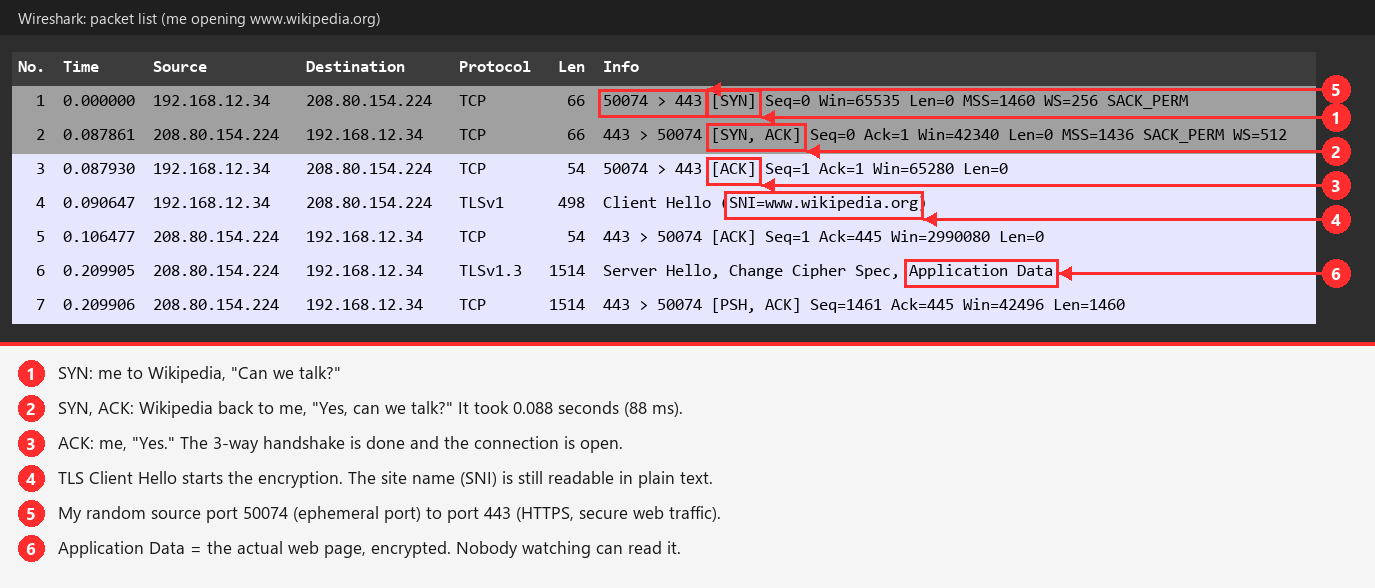
Reading the Info column
50074 > 443 = from my port 50074 to port 443 (HTTPS (HTTP Secure), encrypted web).
The reply flips it: 443 > 50074. Same 4 values (2 IPs + 2 ports) = same connection.
Used for anything where a missing byte would break things (a file, a web page, a login):
- 80 (HTTP (Hypertext Transfer Protocol), unencrypted web)
- 443 (HTTPS (HTTP Secure), encrypted web)
- 22 (SSH (Secure Shell), encrypted remote terminal)
- 21 (FTP (File Transfer Protocol), file transfers)
- 25 (SMTP (Simple Mail Transfer Protocol), sending email)
- 445 (SMB (Server Message Block), Windows file sharing)
- 3389 (RDP (Remote Desktop Protocol), Windows remote desktop)
UDP (User Datagram Protocol): fast, "fire and forget"
- No handshake, no acknowledgments. Sends the packet and moves on. If it is lost, it is lost.
- Used for anything where speed matters more than perfection. In a video call a late packet is useless anyway, so there is no point resending it.
- 53 (DNS (Domain Name System), names > IPs)
- 67/68 (DHCP (Dynamic Host Configuration Protocol), server/client, hands out IPs)
- 161 (SNMP (Simple Network Management Protocol), device monitoring)
- 69 (TFTP (Trivial File Transfer Protocol), file transfer with no login)
- Video calls, online games, streaming
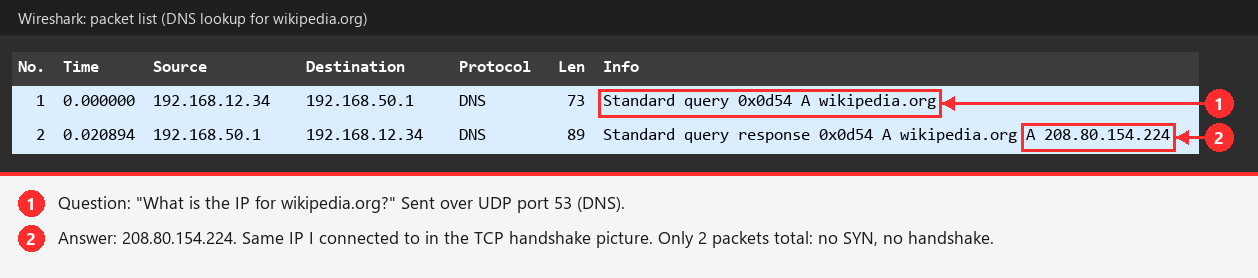
Example: a real DNS lookup (UDP)
Compare this with the TCP picture above. No SYN, no SYN-ACK, no ACK. Just one question and one answer.
Try it yourself
Resolve-DnsName wikipedia.org
Side by side
| TCP (Transmission Control Protocol) | UDP (User Datagram Protocol) | |
|---|---|---|
| Connection | Handshake first | None |
| Reliable | Yes, resends lost data | No |
| Ordered | Yes | No |
| Speed | Slower | Faster |
| Analogy | Phone call | Mailing postcards |
QUIC (Quick UDP Internet Connections)
Chrome and Edge often reach Google over QUIC = HTTPS (HTTP Secure) over UDP 443 instead of TCP. That is why some HTTPS connections in Wireshark have no SYN/SYN-ACK.
TCP flags
You will see these in Wireshark and Nmap.
- SYN (Synchronize): start a connection
- ACK (Acknowledge): acknowledge received data
- FIN (Finish): close the connection politely
- RST (Reset): "go away" / "nothing's here"
- PSH (Push) and URG (Urgent): less common, used for prioritizing data
Reading a real SYN
Packet 1 from the Wikipedia screenshot above:
50074 > 443 [SYN] Seq=0 Win=65535 Len=0 MSS=1460 WS=256 SACK_PERM| Field | Meaning |
|---|---|
50074 | My source port. A random high number (an ephemeral port) picked for each new connection, so my PC can tell its connections apart. |
443 | Destination port (HTTPS (HTTP Secure), encrypted web) |
Seq=0 | Starting sequence number. The real one is random. Wireshark shows it as 0 (a relative sequence number) to make it readable. |
Len=0 | No data. A SYN only asks to connect. |
Win=65535 | Window size: how much data I can receive before the other side must wait for my ACK (Acknowledge). |
MSS=1460 | MSS (Maximum Segment Size): largest data chunk per packet. 1500 (Ethernet limit) minus 40 bytes of IP + TCP headers. Why big packets are exactly 1514 bytes (1460 data + 54 headers). |
WS=256 | WS (Window Scale): lets the window grow beyond 65,535 bytes. |
SACK_PERM | SACK (Selective Acknowledgment) permitted: if one packet is lost, only that one is resent. |
The server's SYN-ACK replied with MSS=1436 WS=512. Both sides state their limits and the connection uses the smaller ones.
Matching a handshake together: a TCP connection is identified by 4 values: source IP, source port, destination IP, destination port. Same 4 values (with ports flipped on replies) = same connection.
| Packet | Time | Direction | Ports | Flags |
|---|---|---|---|---|
| 1 | 0.000 | me > 208.80.154.224 | 50074 > 443 | [SYN] |
| 2 | 0.088 | 208.80.154.224 > me | 443 > 50074 | [SYN, ACK] |
| 3 | 0.088 | me > 208.80.154.224 | 50074 > 443 | [ACK] |
| 4 | 0.091 | me > 208.80.154.224 | 50074 > 443 | Client Hello (SNI=www.wikipedia.org) |
Latency from the handshake
SYN at 0.000, SYN-ACK at 0.088 = about 88 ms round trip. Nmap uses the same timing to tune scan speed.
Ports open on my own PC
A port that is listening is waiting for connections. These are what a port scanner would find if it scanned me.
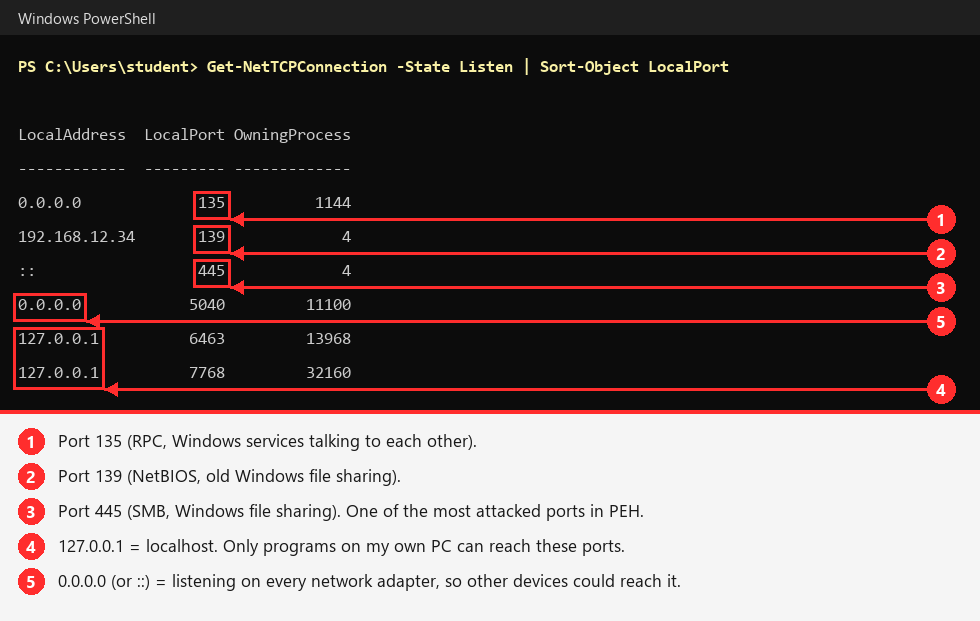
Try it yourself
Get-NetTCPConnection -State Listen | Sort-Object LocalPort
Why it matters for hacking
Port scanning is built on the handshake. What a port answers to a SYN tells you its state:
- SYN > SYN-ACK back = port open
- SYN > RST (Reset) back = port closed
- SYN > nothing = filtered (probably a firewall)
Nmap scan types:
| Command | Name | How it works |
|---|---|---|
nmap -sS | SYN ("stealth") scan | Sends SYN, reads the reply, then sends RST instead of finishing. Fast, less likely to be logged. Default when run as admin. |
nmap -sT | Connect scan | Completes the full handshake. Noisier, no admin needed. |
nmap -sU | UDP (User Datagram Protocol) scan | Slow and less reliable. No reply could mean open or filtered. Often skipped, which means missing SNMP (Simple Network Management Protocol) and TFTP (Trivial File Transfer Protocol), services that are often vulnerable. |