
ARP and DHCP
Oct 18, 2026 · Networking
One line
DHCP (Dynamic Host Configuration Protocol): "I just joined. What IP should I use?"
ARP (Address Resolution Protocol): "I know the IP. What's the MAC?"
Both start with a broadcast, and both trust whoever answers.
Related: OSI Model · MAC Addresses · Switches vs Routers · TCP and UDP
Reference: Acronyms · Ports
DHCP (Dynamic Host Configuration Protocol)
When a device joins a network it has no IP address. A DHCP server (usually the router) hands one out automatically.
The 4 steps: DORA (Discover, Offer, Request, Acknowledge)
My device                           DHCP server (router)
     | -- Discover (broadcast) ---->  |   "Is there a DHCP server? I need an IP."
     | <-- Offer -------------------  |   "You can have 192.168.12.34."
     | -- Request (broadcast) ----->  |   "I'll take 192.168.12.34, please."
| <-- Acknowledge ------------- | "It's yours for 2 hours."- Broadcast (
ff-ff-ff-ff-ff-ff) because the device has no IP yet and does not know where the server is. - Ports: 67 (DHCP server) and 68 (DHCP client), over UDP (User Datagram Protocol).
Example: a real DHCP renewal in Wireshark
I ran ipconfig /renew. Because I already had an IP, my PC skipped Discover and Offer and went straight to Request and Acknowledge (the R and A of DORA).
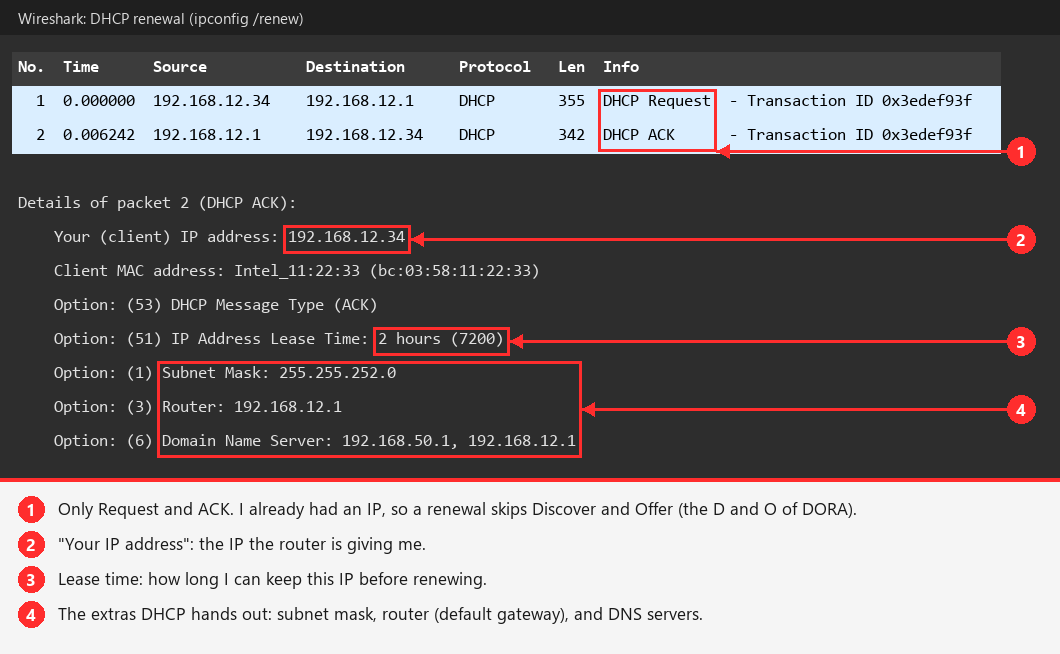
When do you see all 4 steps?
Only when a device has no IP at all: joining Wi-Fi for the first time, or after ipconfig /release then ipconfig /renew. (That drops your Wi-Fi for a few seconds.)
What DHCP hands out
Everything in my ipconfig:
- IP address:
192.168.12.34 - Subnet mask:
255.255.252.0 - Default gateway:
192.168.12.1 - DNS (Domain Name System, names > IPs) servers: who to ask for name lookups
Leases
- The IP is rented, not owned. The rental time = the lease.
- The device renews before it runs out. That is why an IP can change after being disconnected for a while.
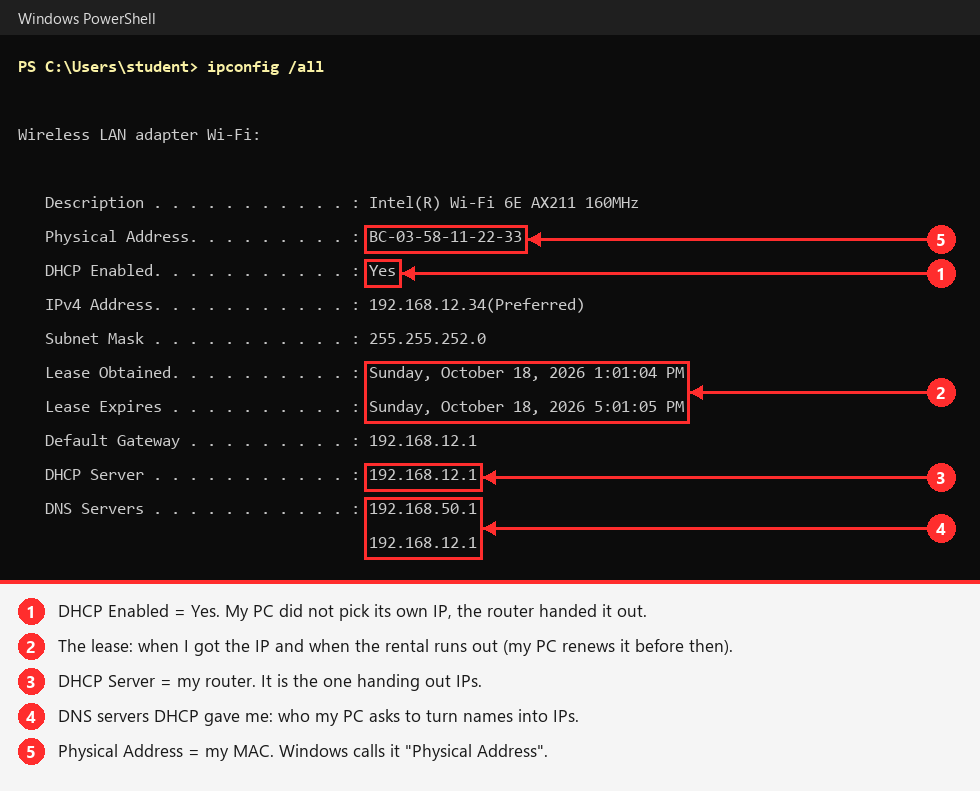
Example: DHCP info on my PC
Try it yourself
ipconfig /all, then find the Wireless LAN adapter Wi-Fi section.
ARP (Address Resolution Protocol)
To send a frame on the LAN (Local Area Network), my PC needs the destination MAC (Media Access Control) address, because that is what switches deliver by. ARP translates IP > MAC.
The 2 steps: Request and Reply
My PC (192.168.12.34)                   Router (192.168.12.1)
     | -- ARP Request (broadcast) ---->  |   "Who has 192.168.12.1? Tell 192.168.12.34."
| <-- ARP Reply (direct) --------- | "192.168.12.1 is at AA-BB-CC-DD-EE-FF."- Request is broadcast, so everyone on the LAN hears it.
- Only the owner of that IP replies, directly to my MAC.
- My PC saves the answer in its ARP cache (see it with
arp -a). Entries expire after a few minutes.
Example: real ARP traffic in Wireshark
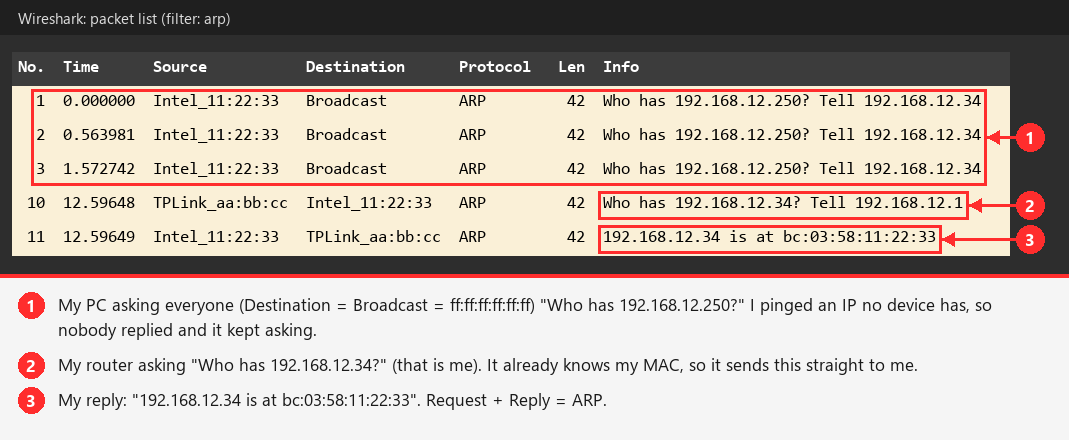
What this shows
- Rows 1 to 3: an ARP Request with nobody home. The IP did not exist, so there was no reply.
- Rows 10 and 11: a full Request and Reply. My router checked that I am still at my MAC, and I answered.
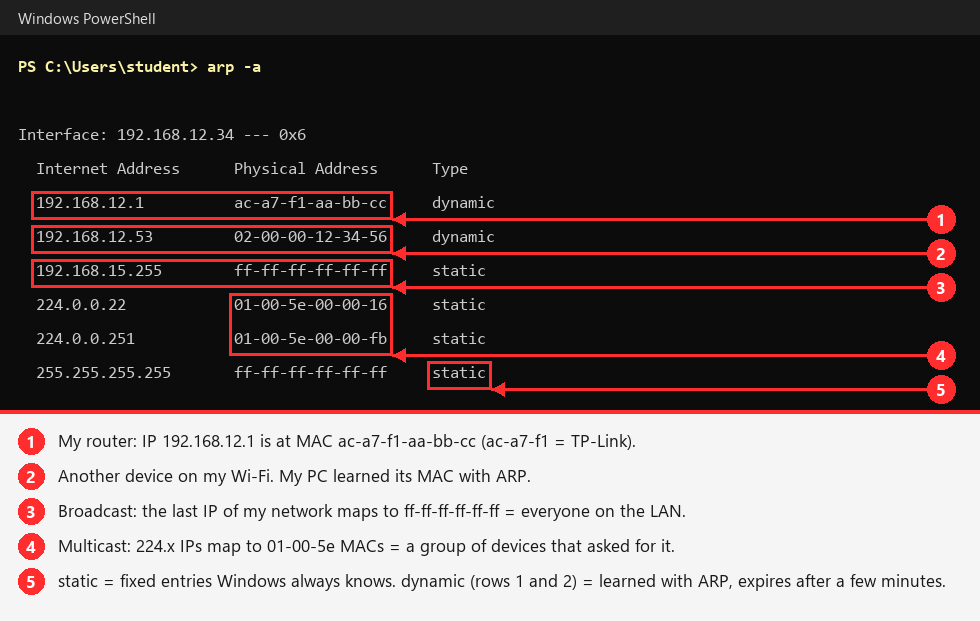
Example: my ARP cache
This is the list of answers my PC has saved.
Try it yourself
arp -a
ARP only works on the local network
To reach Google, my PC does not ARP for Google's IP. It sees Google is not on its subnet, so it ARPs for the router's MAC and sends the frame there. That is why the router is always in my ARP table.
Broadcast: ff-ff-ff-ff-ff-ff
- Broadcast MAC = all 48 bits set to 1 = "everyone on this LAN."
- Used by ARP Requests and DHCP Discover/Request.
- My IP broadcast
192.168.15.255(last address of my/22) maps to it. You can see it in my ARP cache screenshot above. 224.x.x.xIPs map to01-00-5e-...MACs = multicast (a group that asked for it).- Routers do not forward broadcasts. That keeps them inside the broadcast domain (the LAN).
How it all fits together
- Join Wi-Fi > DHCP: "Give me an IP." Get IP, mask, gateway, DNS.
- Open a website > DNS (Domain Name System): "What's google.com's IP?"
- Google isn't local > ARP: "What's my gateway's MAC?"
- Send the frame to the router's MAC, carrying Google's IP.
Why it matters for hacking
Both protocols trust any answer. Neither checks that it is real.
ARP (Address Resolution Protocol) attacks
- ARP spoofing / poisoning: the attacker sends fake replies: "
192.168.12.1is at my MAC." The victim believes it and sends its traffic to the attacker instead of the router. The attacker is now the MITM (Man-in-the-Middle). - Gratuitous ARP: a reply nobody asked for ("this IP is at this MAC"). Devices accept it, which makes spoofing easy.
DHCP (Dynamic Host Configuration Protocol) attacks
Analogy
The router is a parking attendant handing out spots (IPs).
- Starvation = someone grabs every spot with fake cars.
- Rogue DHCP = someone in a fake uniform waves cars into their own lot.
Rogue DHCP server ("rogue" = fake)
- The attacker runs their own DHCP server on the network.
- A device joins and broadcasts: "Is there a DHCP server? I need an IP."
- The attacker answers faster than the real router and says: "Your default gateway is me" (or "your DNS server is me").
- The device believes it, so all its traffic goes through the attacker = MITM (Man-in-the-Middle).
- It works because DHCP never checks who is answering.
DHCP starvation ("starving" the real server of IPs)
- The router only has a limited pool of IPs to hand out (my
/22has about 1,000). - The attacker sends thousands of fake DHCP requests, each from a made-up MAC (Media Access Control) address.
- Every IP gets used up.
- Result: new devices cannot get an IP, so they cannot get online. That is a DoS (Denial of Service, knocking something offline).
- Often used as step 1 of rogue DHCP: once the real server is out of IPs and cannot answer, only the attacker's fake server can.
mitm6 (covered in the PEH (Practical Ethical Hacking) AD (Active Directory) section)
- Windows asks for IPv6 (IP version 6) settings via DHCPv6 (DHCP for IPv6), even on networks that only use IPv4.
- mitm6 answers, becomes the victim's DNS (Domain Name System) server, and captures credentials.
Name lookup attacks (also broadcast/multicast)
- When DNS fails, Windows asks the whole LAN using LLMNR (Link-Local Multicast Name Resolution) and NBT-NS (NetBIOS Name Service).
- The tool Responder answers and captures password hashes. One of the first AD (Active Directory) attacks in PEH.
Passive recon
Just listening in Wireshark on a LAN shows ARP and DHCP broadcasts from every device. That is a free list of what is on the network.