
MAC Addresses
Oct 18, 2026 · Networking
One line
MAC (Media Access Control) address = hardware address for one network interface = Layer 2 (Data Link layer) = what switches use to deliver data on the same local network.
Related: OSI Model · IP Addresses · Switches vs Routers · ARP and DHCP
Reference: Acronyms · Ports
What a MAC address is
- A hardware address for one NIC (Network Interface Controller, network card).
- 48 bits long, written as 6 pairs of hex digits. Example:
BC-03-58-11-22-33. - First 3 pairs = OUI (Organizationally Unique Identifier) = who made the hardware.
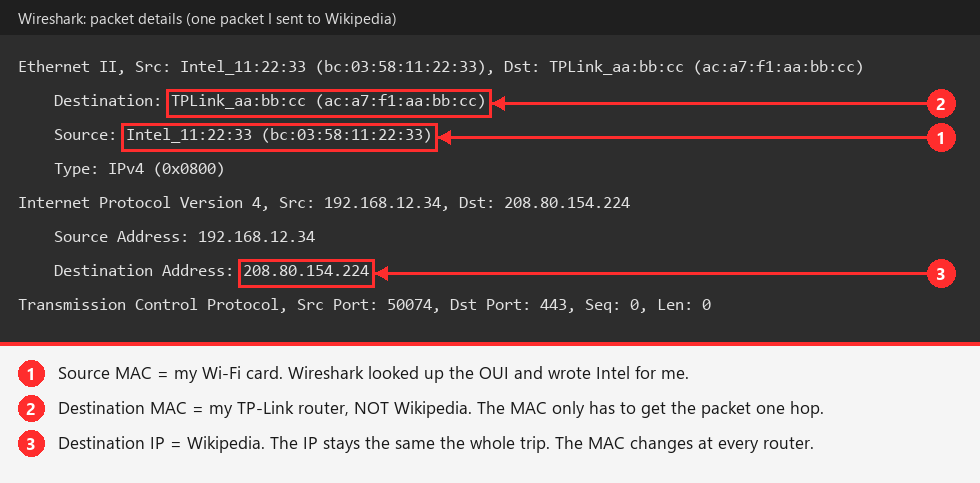
00-15-5D= Microsoft's prefix for Hyper-V virtual adapters.BC-03-58= Intel (Wireshark labeled my Wi-Fi cardIntel_11:22:33).AC-A7-F1= TP-Link (my router showed up asTPLink_aa:bb:cc).
- Last 3 pairs = serial number the manufacturer assigns.
- Look up any OUI (Organizationally Unique Identifier) at
macvendors.com.
MAC vs IP
| MAC (Media Access Control) | IP (Internet Protocol) | |
|---|---|---|
| OSI (Open Systems Interconnection) layer | 2 (Data Link) | 3 (Network) |
| Type | Physical / hardware | Logical / assigned |
| Scope | Local network only | Across the internet |
| Used by | Switches | Routers |
| Changes? | Rewritten at every hop | Same start to finish (except at NAT (Network Address Translation)) |
MAC only travels one hop
- When I send something to Google, my PC puts my router's MAC as the destination. The MAC's only job is getting the data across my home network to the router.
- My router then swaps in its own MAC and passes it to the next router, and so on. The MAC changes at every router, but the IP stays the same the whole way.
- So Google never sees my MAC address. It only sees my public IP.
Example: one real packet, seen in Wireshark
I opened www.wikipedia.org and looked at the first packet my PC sent. The destination MAC is my router, but the destination IP is Wikipedia.
Simple way to remember
MAC = "who gets this next" (one hop). IP = "where it is finally going" (the whole trip).
Why my PC shows 4 MAC addresses
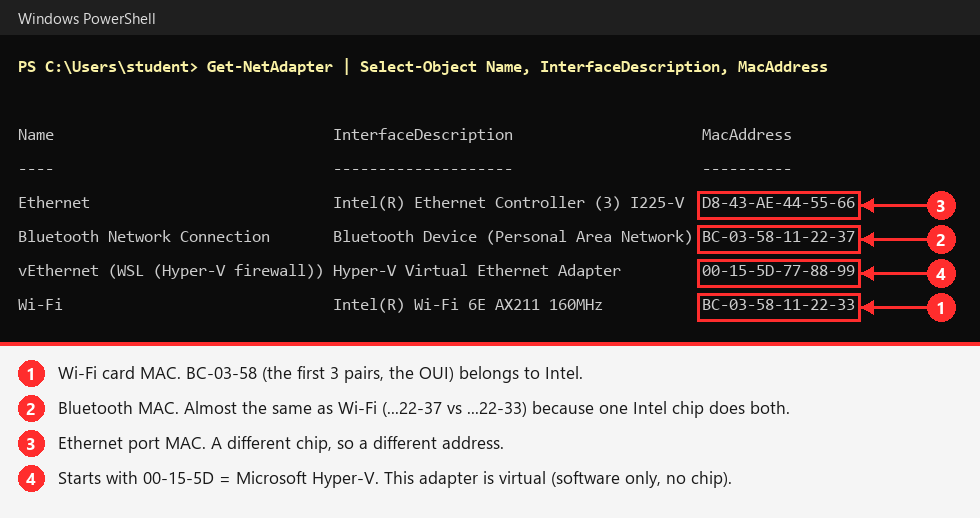
Each network adapter has its own MAC.
Example: my real adapters
Try it yourself
Get-NetAdapter | Select-Object Name, InterfaceDescription, MacAddress
Summary of the screenshot:
| Adapter | MAC | What it is | Physical? |
|---|---|---|---|
| Ethernet | D8-43-AE-44-55-66 | Intel I225-V, wired port on the motherboard | Yes |
| Wi-Fi | BC-03-58-11-22-33 | Intel AX211 wireless card | Yes |
| Bluetooth Network Connection | BC-03-58-11-22-37 | Bluetooth networking | Yes, same chip as Wi-Fi |
| vEthernet (WSL) | 00-15-5D-77-88-99 | Virtual network card for WSL (Windows Subsystem for Linux) | No, software only |
Wi-Fi and Bluetooth MACs are almost identical (...22-33 vs ...22-37)
The AX211 is a combo chip that does both, so Intel gave it a block of consecutive addresses.
Hidden adapters: ipconfig also shows "Local Area Connection* 1, 2, ..." These are hidden virtual Wi-Fi adapters for Mobile Hotspot and Wi-Fi Direct. See them with:
Get-NetAdapter -IncludeHidden | Select-Object Name, MacAddressNICs (Network Interface Controllers)
- Hardware that turns data into signals on a medium:
- Electrical signals over a cable for Ethernet
- Radio waves for Wi-Fi and Bluetooth
- Can be built into the motherboard (my Ethernet), a small M.2 card (my AX211), or a USB dongle.
- Virtual adapters (like the WSL (Windows Subsystem for Linux) one) act like NICs but exist only in software. I will make lots of these when setting up VMs (Virtual Machines) for PEH (Practical Ethical Hacking).
Phones have MAC addresses too
- Anything that connects to a network needs one. A phone has several:
- Wi-Fi
- Bluetooth
- Cellular radio (has its own identifiers)
- Modern phones use a random MAC per Wi-Fi network (iPhone: "Private Wi-Fi Address", Android: "Randomized MAC") so stores and public Wi-Fi cannot track them by a stable hardware ID.
Broadcast MAC: ff-ff-ff-ff-ff-ff
- All 48 bits set to
1. Means "everyone on this LAN (Local Area Network)." - Not owned by any device. A switch sends it out every port.
- Used when a device needs to talk to something but does not know its MAC yet:
- ARP (Address Resolution Protocol, IP > MAC lookup) Requests
- DHCP (Dynamic Host Configuration Protocol, auto-assigns IPs) Discover
- The IP broadcast pairs with it. My network's IP broadcast
192.168.15.255maps toff-ff-ff-ff-ff-ff. 01-00-5e-...MACs are multicast: "send to a group that asked for it," not everyone.- Routers do not forward broadcasts. Everything that hears one broadcast = a broadcast domain (basically the LAN).
- Screenshots of broadcasts on my network: ARP and DHCP.
Why it matters for hacking
- MAC spoofing: the MAC is burned into the chip, but the OS (Operating System) can override it. Used to dodge MAC filters or impersonate a device.
- ARP (Address Resolution Protocol) spoofing only works on the local network, because that is the only place MAC addresses exist. You must be on the same LAN (Local Area Network) as the victim.
- OUI (Organizationally Unique Identifier) lookups during recon tell you what kinds of devices are on a network (Cisco, HP printer, Apple, etc.).
- Broadcasts are trusting. Anyone can answer them, which leads to ARP spoofing and LLMNR (Link-Local Multicast Name Resolution) poisoning.