
Day 02: Network Refresher, Wireshark and my Kali lab
Day 02 · Oct 18, 2026
Today in one line
I finished the Network Refresher section, watched real traffic from my own PC in Wireshark to prove each idea, built two practice games to learn the OSI (Open Systems Interconnection) model and subnetting, and set up my Kali Linux VM (Virtual Machine) for the rest of the course.
My notes from today
| Note | What it covers |
|---|---|
| OSI Model | The 7 layers, encapsulation, attacks by layer |
| IP Addresses | Private ranges, NAT (Network Address Translation), subnet masks |
| MAC Addresses | OUI (Organizationally Unique Identifier), why a PC has several MACs, the broadcast MAC |
| Switches vs Routers | Layer 2 vs Layer 3, CAM (Content Addressable Memory) tables, tracert |
| TCP and UDP | The 3-way handshake in Wireshark, TCP flags, Nmap scan types |
| ARP and DHCP | ARP (Address Resolution Protocol) and DHCP (Dynamic Host Configuration Protocol) on the wire, spoofing and starvation attacks |
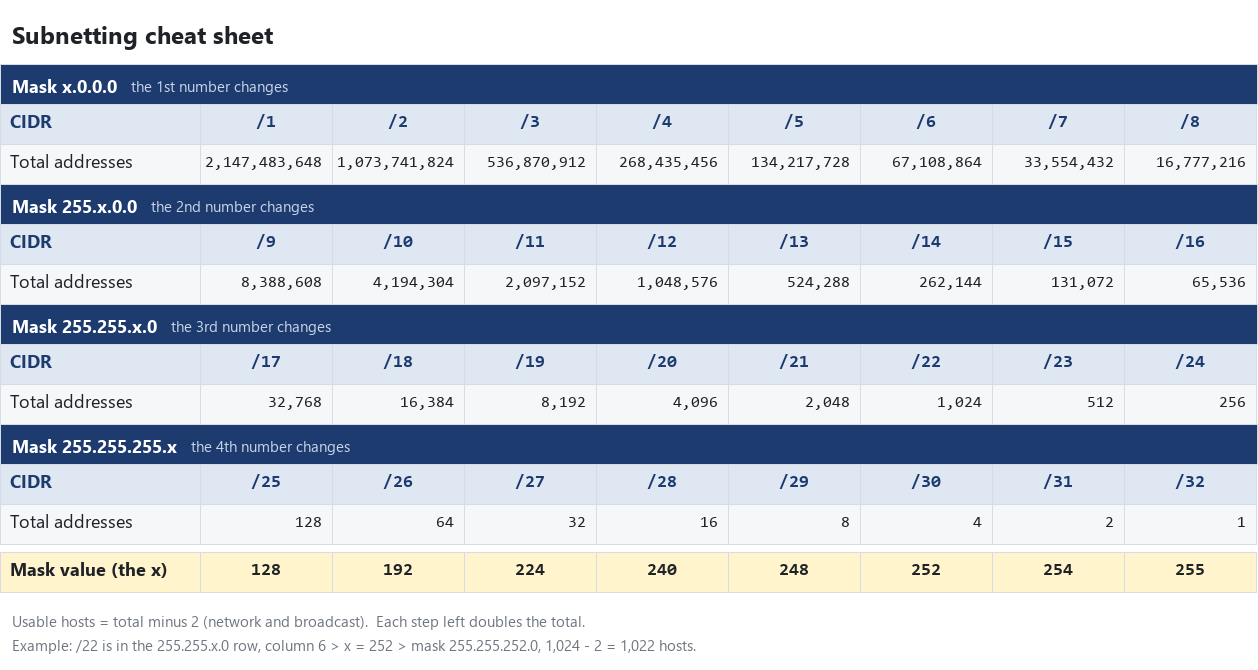
| Subnetting | CIDR (Classless Inter-Domain Routing), block size method, The Cyber Mentor's sheet |
| Ports | Common ports and why they matter |
| Acronyms | Every acronym so far |
What I learned
1. MAC addresses only work inside my own network. IP addresses work across the internet.
In Wireshark, a packet I sent to Wikipedia had my router's MAC as the destination, but Wikipedia's IP. My PC only uses the MAC to get the packet to my router. After that, the IP is what gets it to Wikipedia. That's also why ARP spoofing only works when you're on the same network as the victim.
2. A port scan is just reading the TCP handshake.
SYN > SYN-ACK means open, SYN > RST means closed, no answer means filtered. I watched a real SYN, SYN-ACK, ACK to port 443 (HTTPS).
3. UDP has no handshake at all.
A DNS (Domain Name System) lookup was exactly 2 packets.
4. ARP and DHCP trust whoever answers.
I captured my router asking "Who has my IP?" and my PC answering with its MAC. Nothing checks that an answer is real. That's what makes these two attacks possible:
- ARP spoofing: an attacker on my network answers "I'm the router" before the real router does, so my traffic goes through them first.
- Rogue DHCP: a fake DHCP server hands out IPs and tells devices to use the attacker as their router or DNS server.
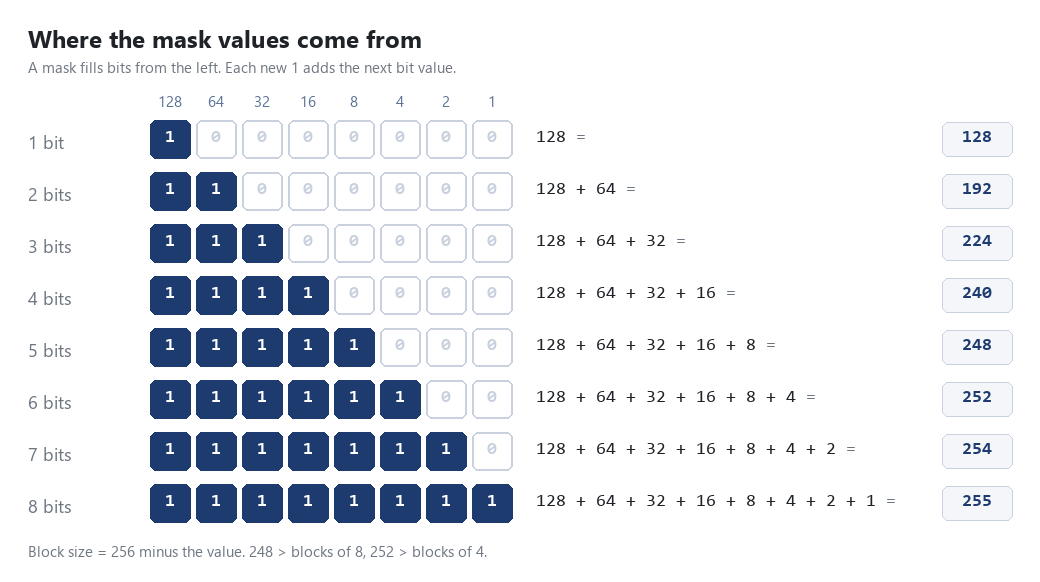
5. Subnetting is mostly one trick: block size = 256 minus the mask value.
The /number counts the 1s in the mask. The mask values (128, 192, 224, 240, 248, 252, 254, 255) are just the bit values added up one at a time:
Once that clicked, The Cyber Mentor's sheet made sense. Here's my own version of it:
Quiz mistakes I learned from
- "Which IPs are valid on 10.10.0.0/16?" I picked
10.10.0.265. Every octet must be 0 to 255, so 265 is not a real IP. I also picked10.11.15.10, but a /16 locks the first two octets, so 10.11 is a different network. - "Which two addresses are reserved in 192.168.0.1/24?" I picked
.1. The reserved ones are the network (.0) and broadcast (.255)..1is usually the router, but it is still an assignable host.
Tools I used and built
- Wireshark + Npcap: captured my own traffic. First lesson: pick the right interface (Wi-Fi, not "Local Area Connection*").
- PowerShell:
ipconfig /all,arp -a,Get-NetAdapter,tracert,Get-NetTCPConnection,Test-NetConnection. - OSI Layers (my practice game): put the layers in order, sort terms into layers, and name the layer of each line in real packets.
- Subnetting Course (my practice course): 6 short parts, each one unlocked by working problems out in my notebook.
Privacy
All screenshots in these notes use dummy IP and MAC addresses (like 192.168.12.34 and BC-03-58-11-22-33) in place of my real ones. The subnet math still works exactly the same.
Lab setup: Kali Linux VM
- Hypervisor: VirtualBox 7.0.16 (already installed)
- Image: official Kali Linux 2026.2 VirtualBox image from
cdimage.kali.org - Verified the download's SHA256 checksum against Kali's published list before using it
- Gave the VM 4 GB RAM and 4 CPUs (the image ships with 2 GB and 2)
- Default login is
kali/kali. Change it on first boot withpasswd.
Next up
- First boot of Kali: update it (
sudo apt update && sudo apt full-upgrade -y) and change the password - PEH section 05: setting up the lab, then Linux basics
- Finish all 6 parts of Subnetting Course